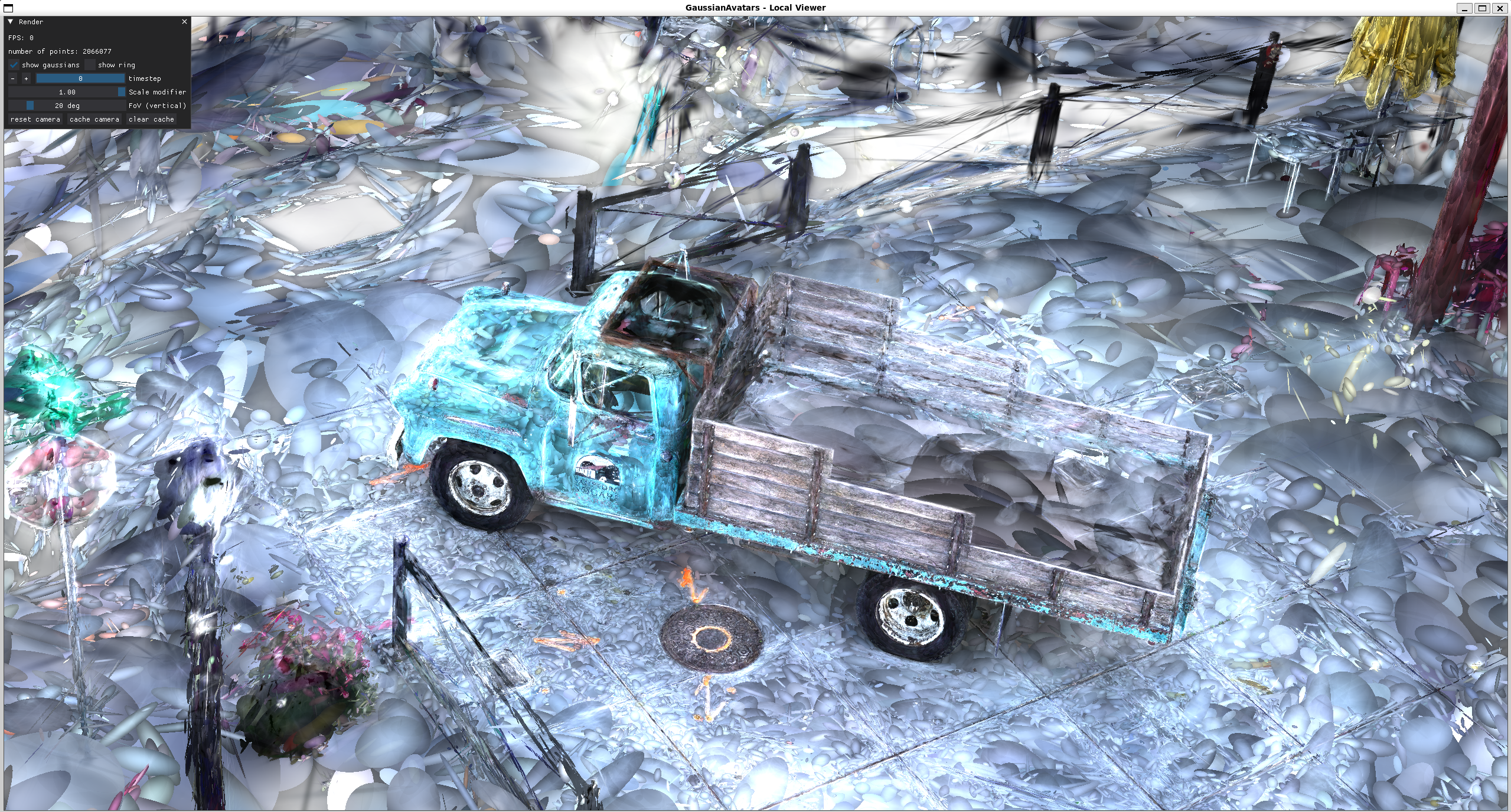
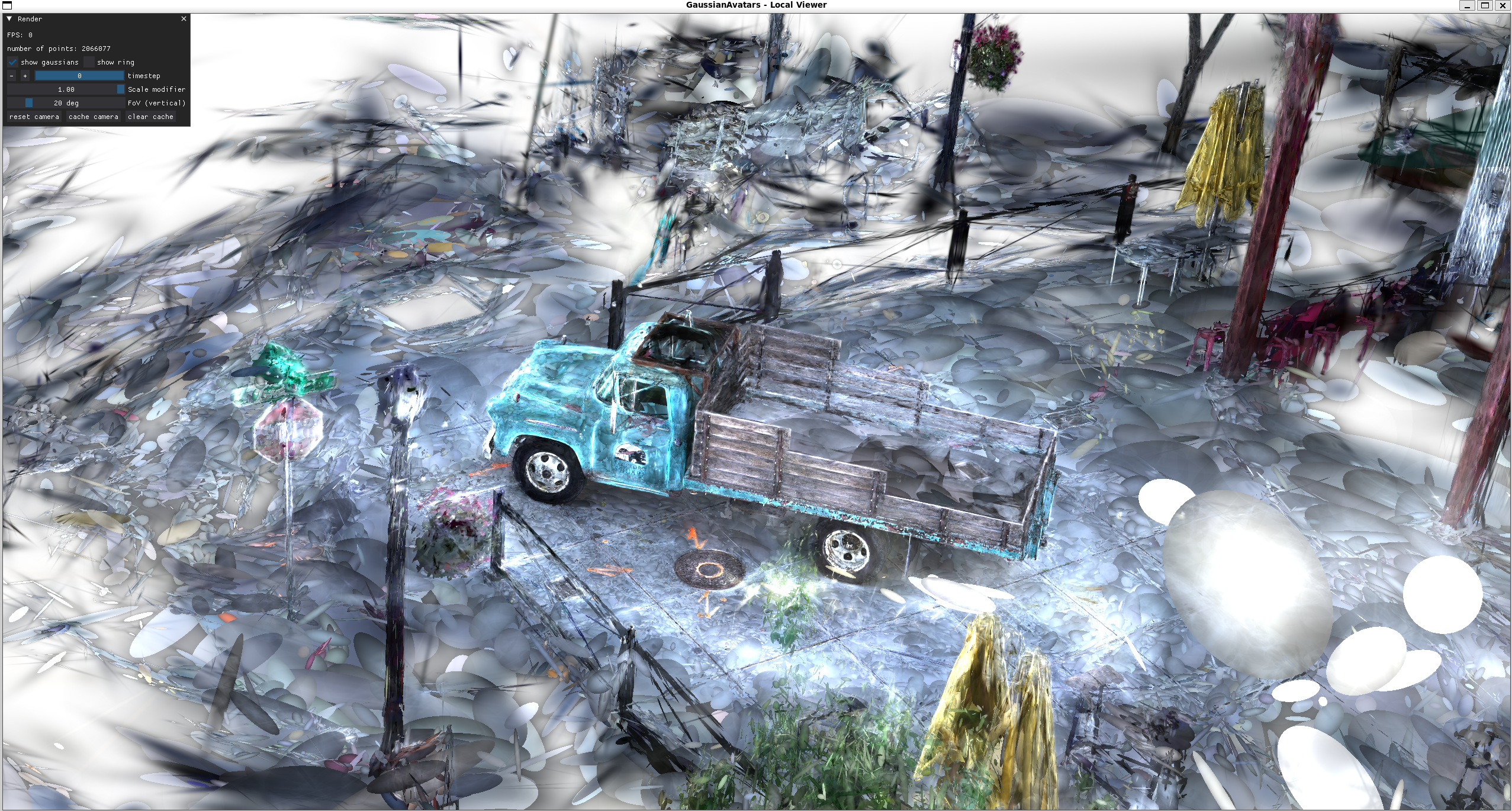
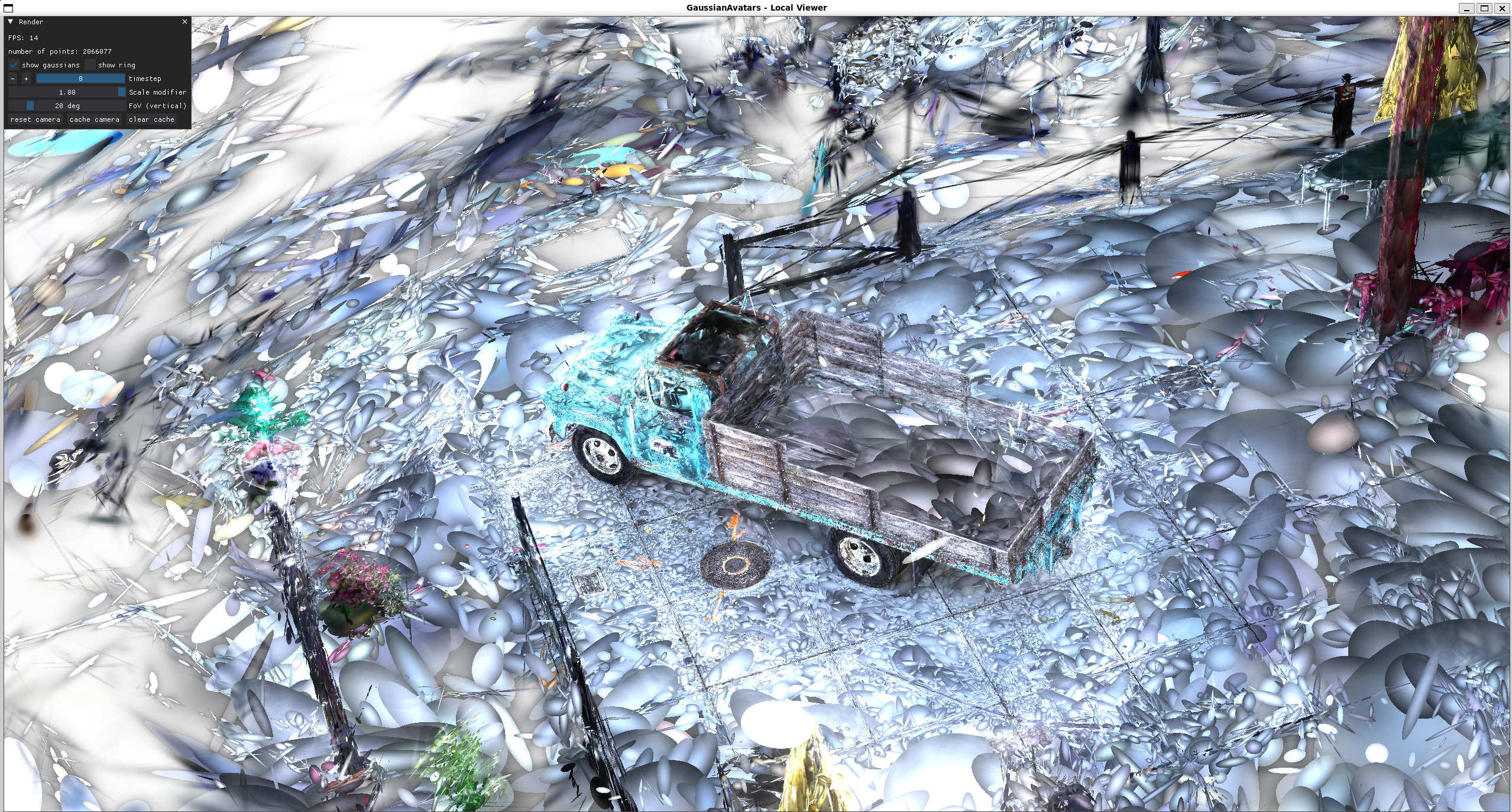
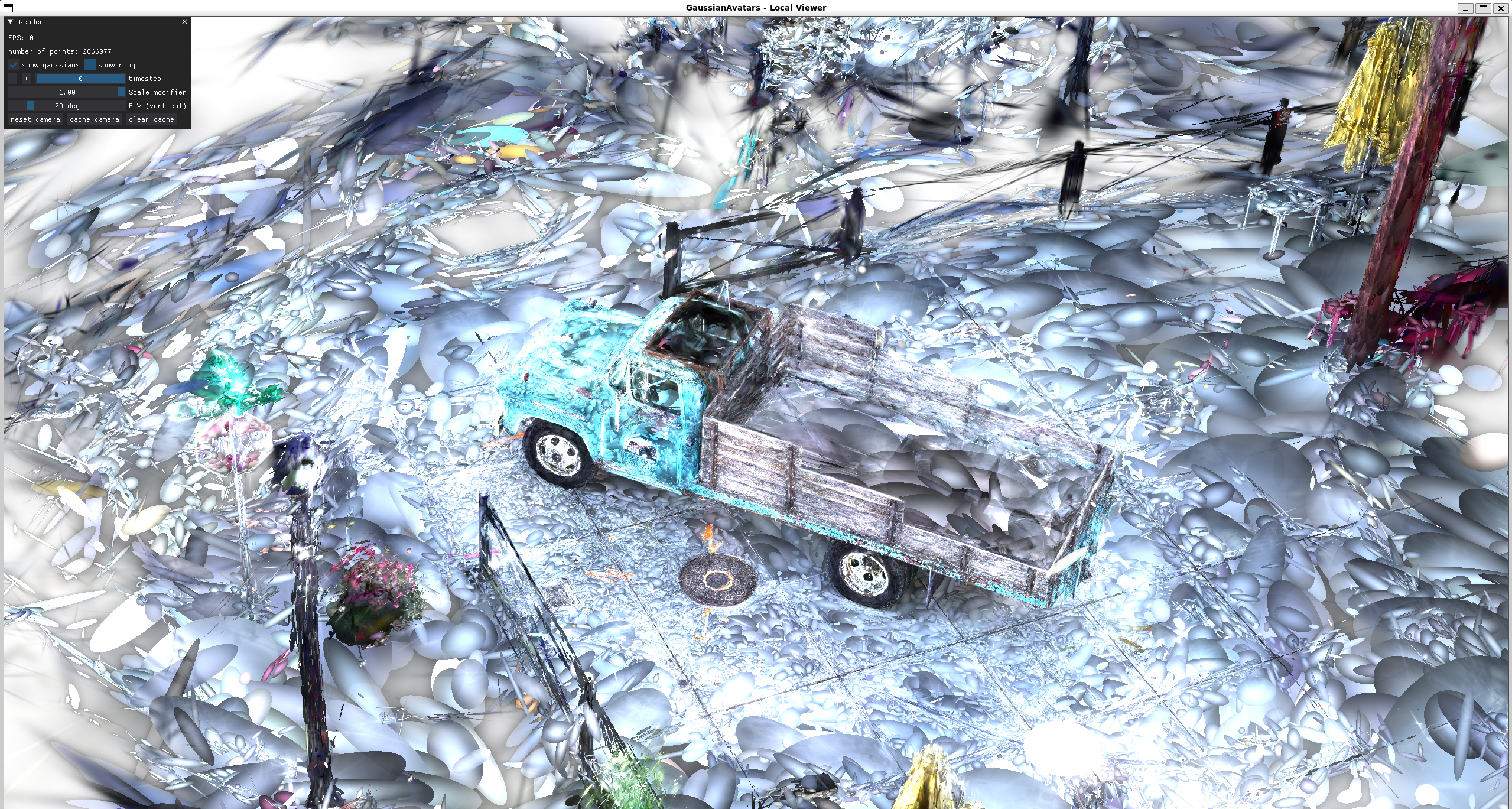
3DGS

这是在西湖大学实验室做3DGS相关项目的记录,由于但是时间匆忙这是之后整理了的比较混乱。

算法总览
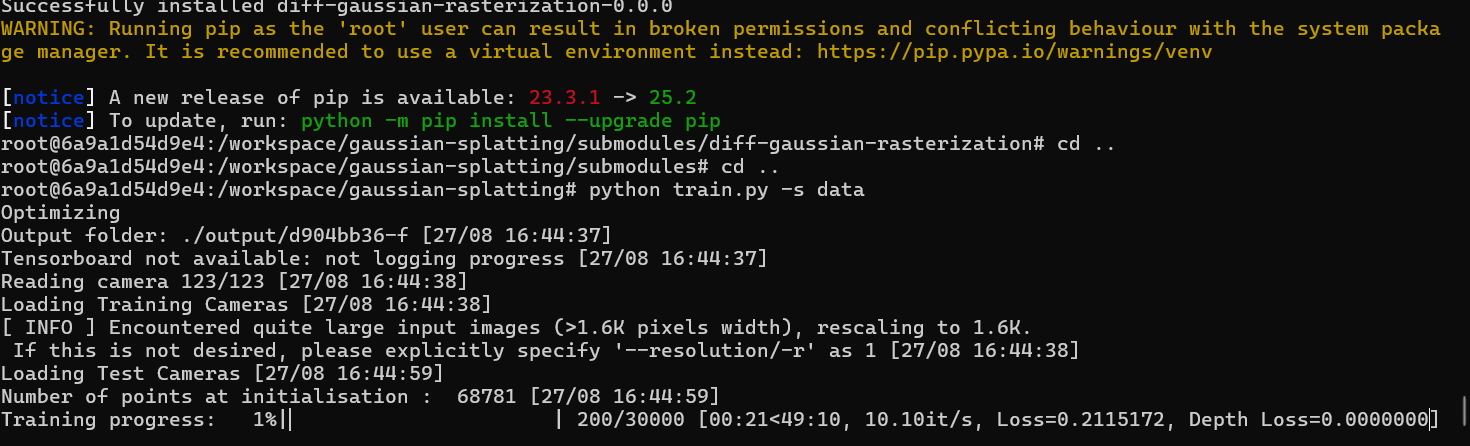

“%ProgramFiles(x86)%\Microsoft Visual Studio\2019\Community\Common7\Tools\VsDevCmd.bat”

set http_proxy=http://127.0.0.1:7890
set https_proxy=http://127.0.0.1:7890

COLMAP cameras.bin, images.bin, points3D.bin
Blender 生成的是合成模拟的数据集,通常导出为:

  • 渲染后的 2D 图像(RGB)

  • 可选 深度图 / 法线图 / 完整几何模型(mesh 或 point cloud)

  • 相机参数(位置、焦距、方向等),可能以 .json, .fbx, 或自定义格式导出,供 NeRF 或 3DGS 使用

模块文件 功能说明
dataset_readers.py 注册数据加载方式,识别是 COLMAP 还是 Blender 数据集类型
colmap_loader.py 读取 cameras.bin, images.bin, points3D.bin 文件,构造基础场景信息
cameras.py 格式化相机信息(JSON 输出,训练/渲染用的相机实例等)
gaussian_model.py 核心初始化:从点云创建初始 Gaussians,包括位置、协方差、颜色、透明度

docker run –gpus all -it -v E:\3DGS\data:/workspace/local_data -v E:\3DGS\outputs:/workspace/local_outputs -v E:\3DGS\taming-3dgs:/workspace/taming-3dgs kfzzzzzz_3dgs_image:latest bash

pip uninstall -y diff-gaussian-rasterization simple-knn

python train.py
-s /workspace/local_data/treehill
-m /workspace/local_outputs/tamingrun5
–mode final_count
–budget 150000
–cams 10
–sh_lower
–ho_iteration 30000

python render.py
–source_path /workspace/local_data/treehill
–model_path /workspace/local_outputs/tamingrun2
–skip_train
–iteration 30000
–eval

python metrics.py -m /workspace/local_outputs/tamingrun1

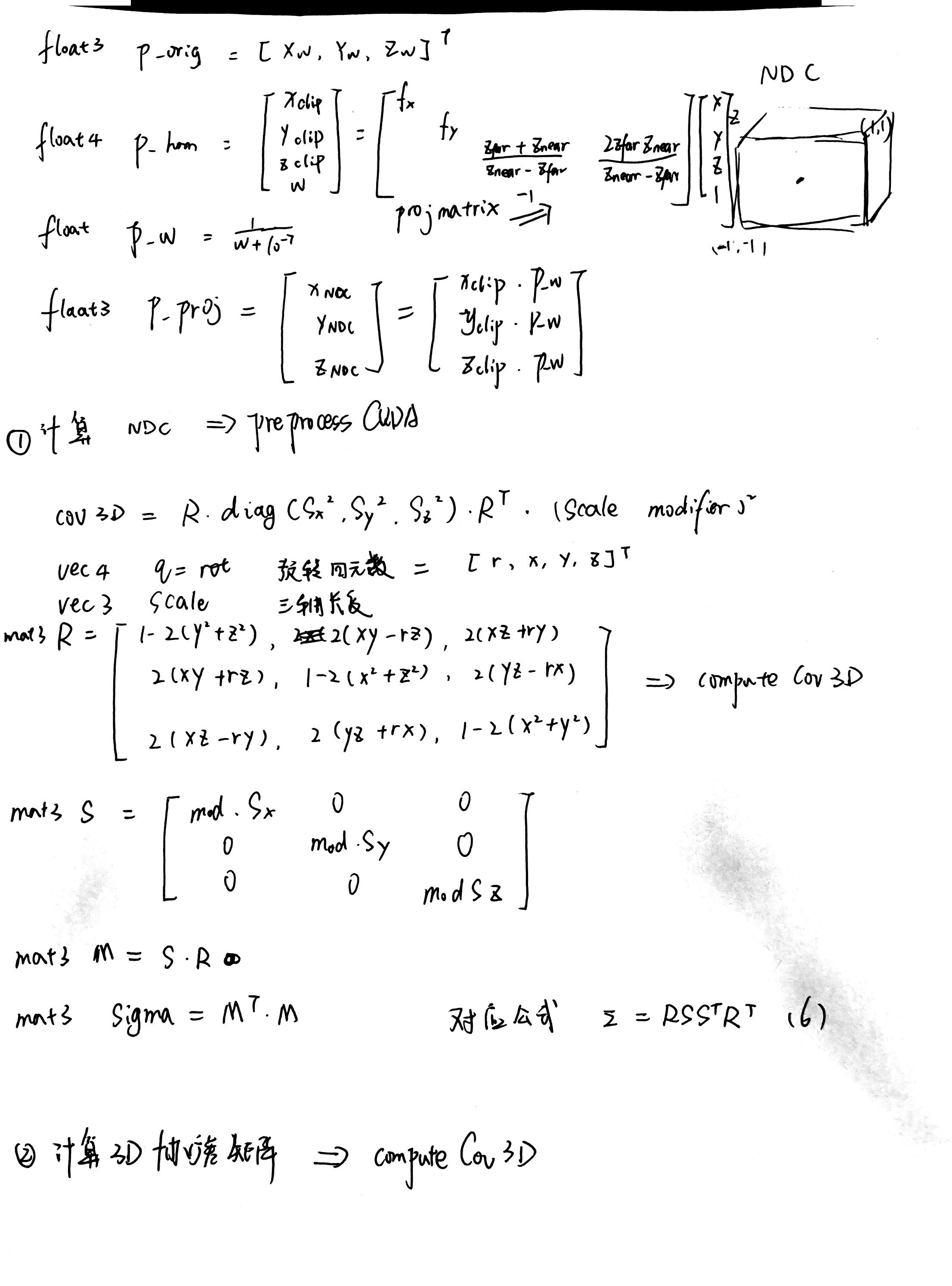
裁剪空间
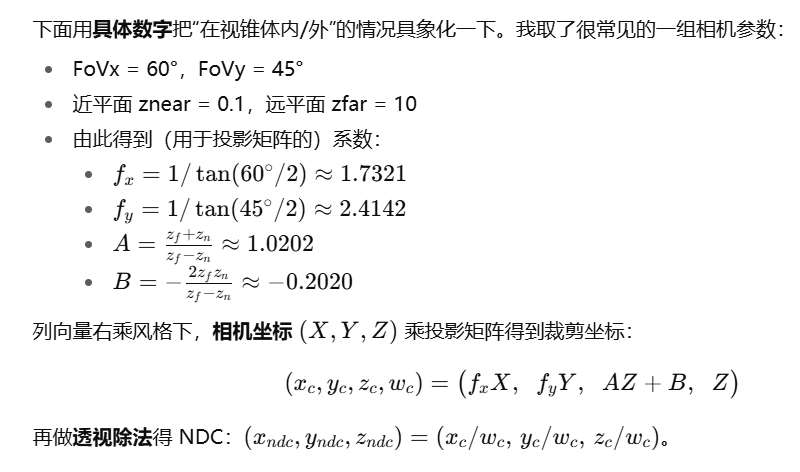

透视投影矩阵
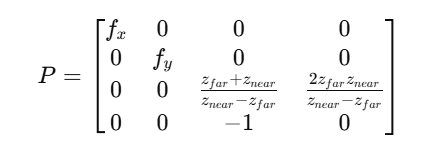
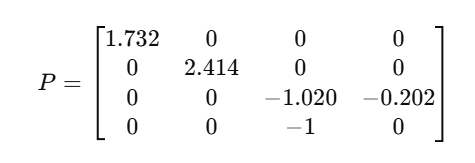
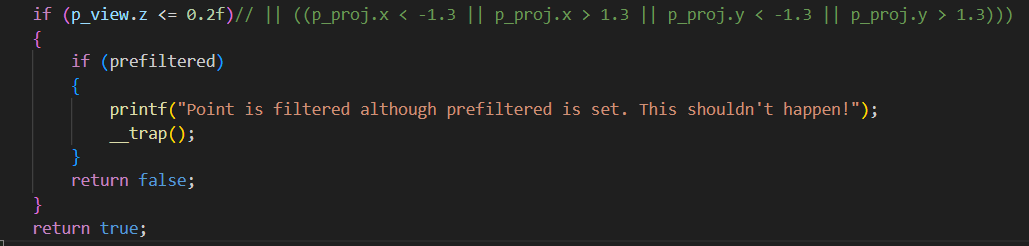
diff_gaussian_rasterization->CudaRasterizer->markVisible->checkFrustum->
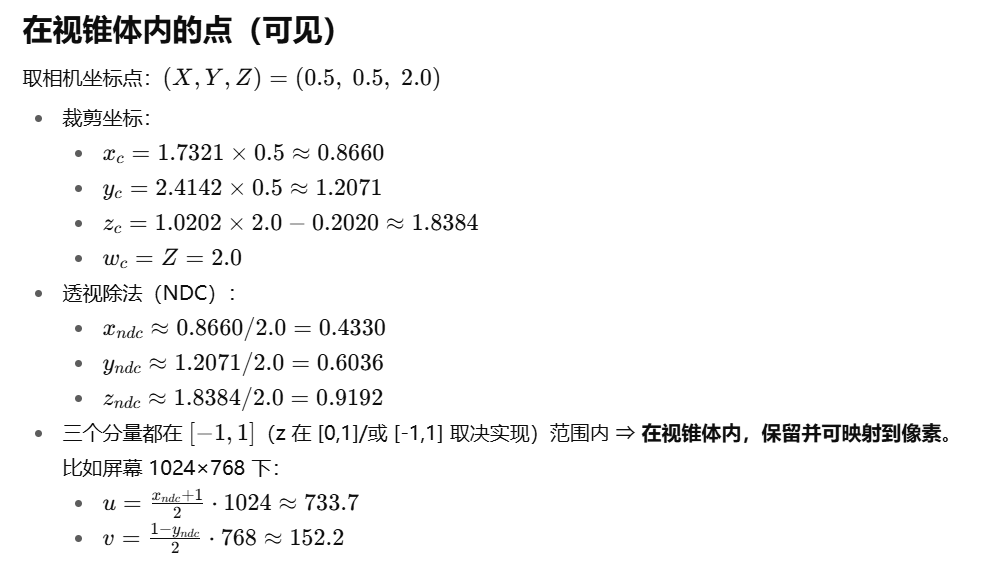
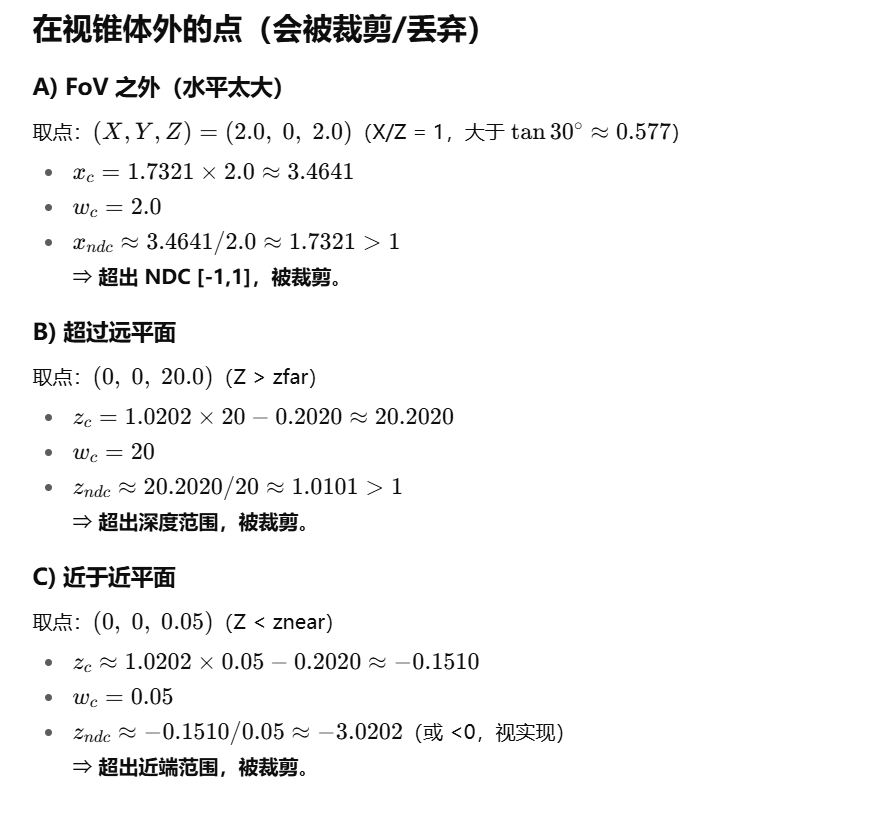

实际只去除了近点(但是在后续 光栅化阶段,如果它们的 footprint 完全不覆盖屏幕,最后的半径 radii=0,PyTorch 侧的 visibility_filter 会把它们排除掉)
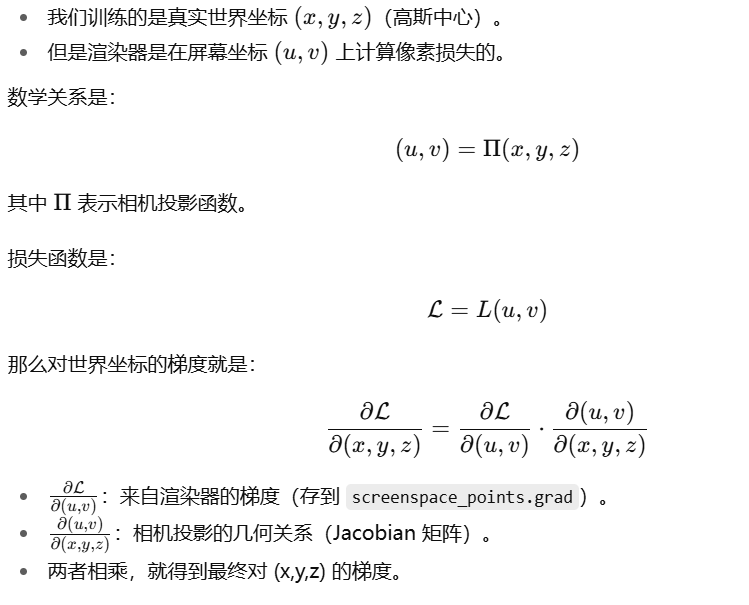
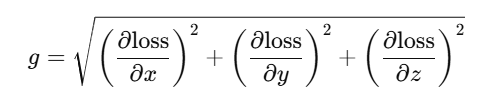
xyz_gradient_accum 累计梯度强度

梯度强度
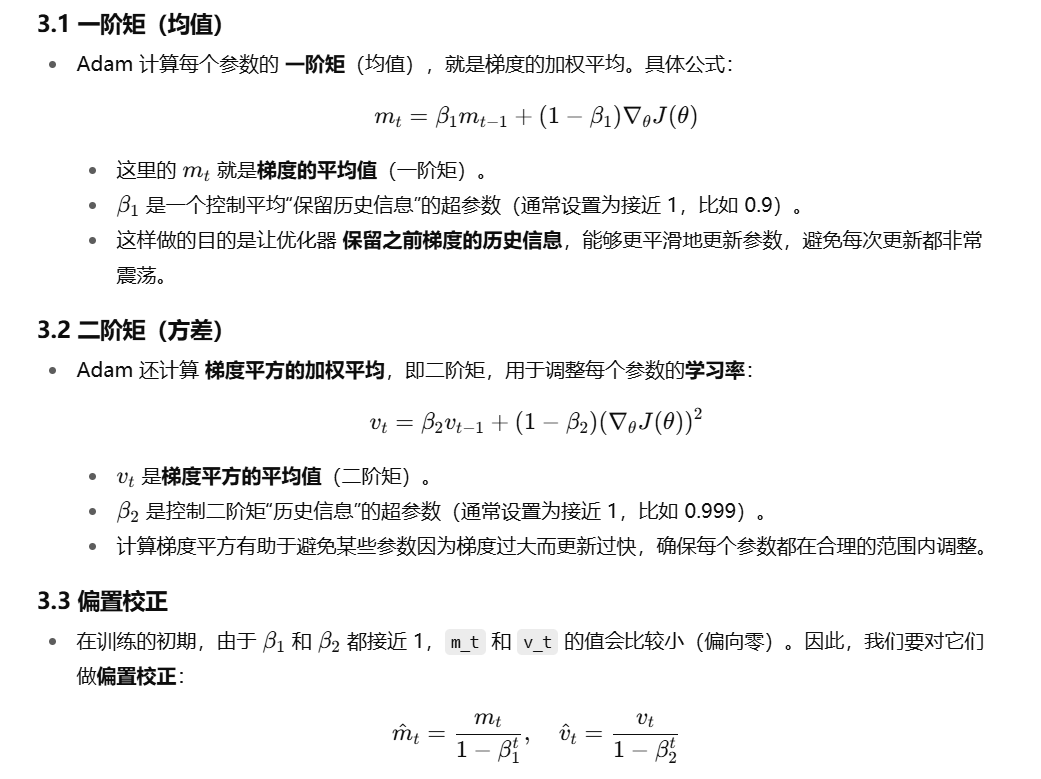
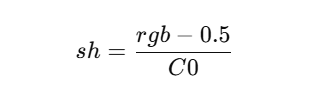
RGB转SH
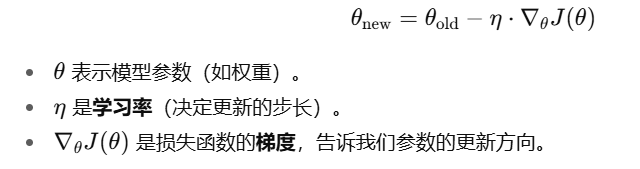
标准梯度下降

致密化过程

伪代码

1
2
3
4
5
6
7
8
9
10
11
12
13
14
15
16
17
18
19
20
21
22
23
24
if 当前迭代数 < densify_until_iter:   # 只在指定范围内做致密化

# 1. 更新每个可见点在2D图像空间中的最大半径
对于 所有可见点:
max_radii2D[点] = max( max_radii2D[点], 当前帧radii[点] )

# 2. 累积点的梯度强度统计,用于后续 densify 判断(只统计了x,y)
对于 所有可见点:
xyz_gradient_accum[点] += sqrt(x^2+y^2)
denom[点] += 1

# 3. 是否到达致密化的时机?
if 当前迭代数 > densify_from_iter 且 当前迭代数是 densification_interval 的倍数:
如果 当前迭代数 > opacity_reset_interval:
size_threshold = 20
否则:
size_threshold = None
调用 densify_and_prune(梯度阈值, 不透明度阈值=0.005, 相机范围, size_threshold, radii)

# 4. 是否需要重置点的不透明度?
if 当前迭代数是 opacity_reset_interval 的倍数
或 (背景是白色 且 当前迭代数 == densify_from_iter):
调用 reset_opacity()

densify_and_prune

1.传入参数

  • max_grad:梯度阈值。可见点的“累计梯度强度”超过它就认为细节不够,需要加点。
  • min_opacity:不透明度阈值。低于它的点会被视为“几乎透明”,可删。固定0.005
  • extent:场景尺度(如相机包围球半径),用于把“世界尺寸”判断成相对量级。
    -self.cameras_extent = scene_info.nerf_normalization[“radius”] ??
  • max_screen_size:屏幕空间半径上限(像素级)。点在屏幕投影太大就删;可能为 None。如果透明度还没重置过 阈值为None 重置过 阈值固定20
  • radii:当前这一帧每个点在屏幕上的半径(像素)。

2.计算 累计梯度强度/出现频率

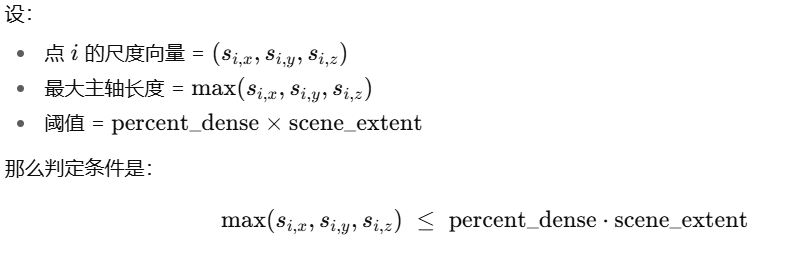
3.densify_and_clone:如果梯度强度对于阈值&&逻辑尺寸小于阈值,直接复制
4.densify_and_split:
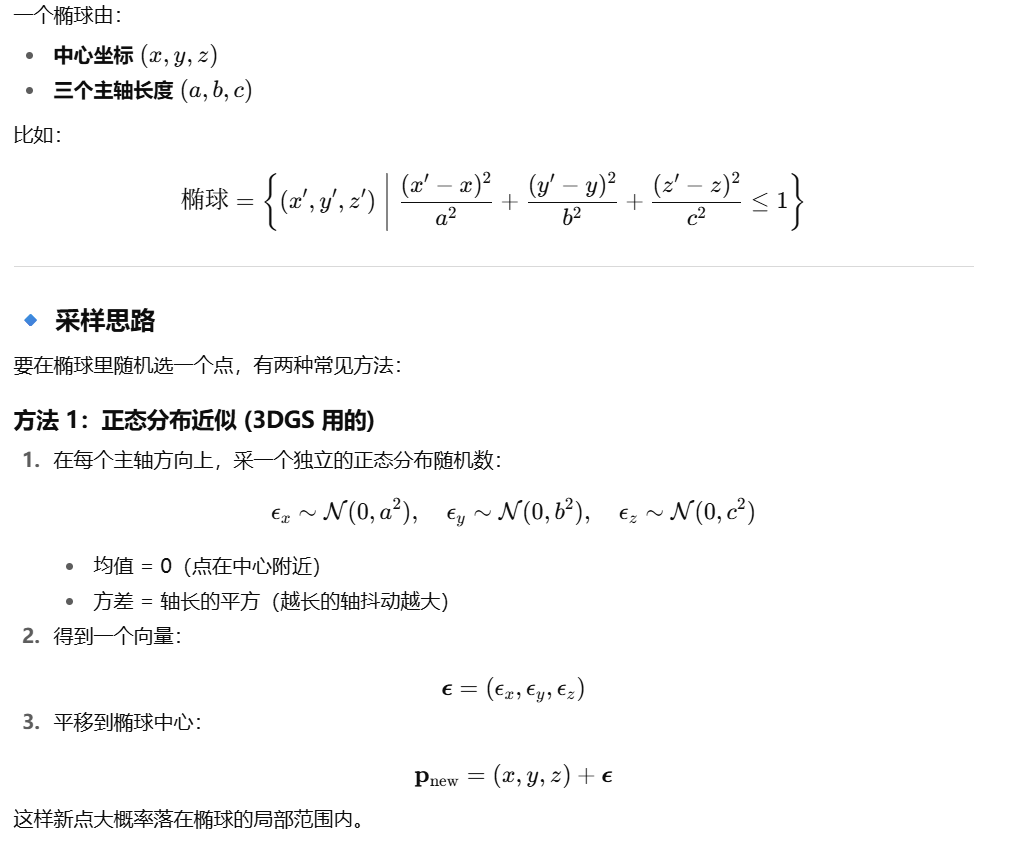
中心位置偏移:

三轴长度 /0.8*N

5.减枝prune
条件1:self.get_opacity < min_opacity
条件2:big_points_vs = self.max_radii2D > max_screen_size 渲染后半径过大
条件3:big_points_ws = self.get_scaling.max(dim=1).values > 0.1 * extent 轴长过长

透明度重置
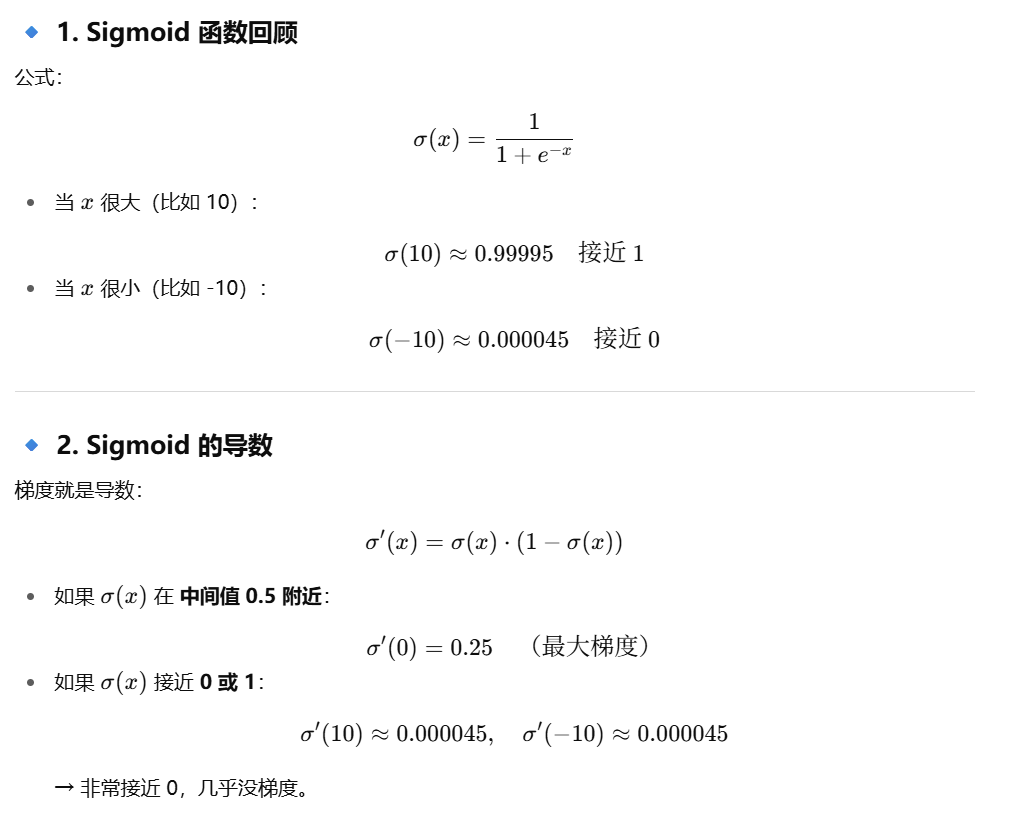
 self.cameras_extent = scene_info.nerf_normalization[“radius”]

render

输入render参数
render_pkg = render(
viewpoint_cam, # 相机(位姿、内参、分辨率、可选alpha_mask)
gaussians, # 所有高斯体(位置xyz、缩放scaling、旋转、SH特征/颜色、opacity等)
pipe, # 渲染管线配置(光栅化器/着色开关、是否debug等)
bg, # 背景颜色(白或黑或随机RGB)
use_trained_exp=dataset.train_test_exp, # 是否使用已学到的曝光/相机响应修正
separate_sh=SPARSE_ADAM_AVAILABLE # 稀疏Adam可用时,SH参数分离以便只更新“可见点”
)

输入rasterizer参数

  • means3D:高斯中心 (N×3)
  • means2D:上面那个 screenspace proxy
  • opacity:不透明度
  • 协方差:
    • 如果 pipe.compute_cov3D_python → 在 Python 端算好 cov3D_precomp
    • 否则交给光栅化器用 scales + rotations 计算
  • 颜色:
    • 如果 override_color → 直接用
    • 否则:
      • pipe.convert_SHs_python → 在 Python 端用视线方向解码 SH
      • 否则直接传 SH 系数给光栅化器

通过链式法则传递loss到高斯椭球

diff-gaussian-rasterization

1
2
3
4
5
6
7
8
9
10
11
12
13
14
15
16
17
18
19
20
21
22
23
24
25
26
27
28
29
30
31
32
33
34
35
36
37
38
39
40
41
42
43
44
45
46
47
48
49
50
51
52
53
54
55
56
57
58
59
60
61
62
63
64
65
66
67
68
69
70
71
function render(viewpoint_cam, gaussians, pipe, bg, use_trained_exp, separate_sh):
# ----------------------------
# Step 1: 相机投影
# ----------------------------
viewspace_points = []
radii = []
visibility_filter = []

for g in gaussians:
# 世界坐标 → 相机坐标
pos_cam = viewpoint_cam.world_view_transform * g.xyz

# 相机坐标 → 屏幕空间
pos_screen = viewpoint_cam.projection_matrix * pos_cam

# 计算屏幕半径 (由 scaling/旋转映射过来)
r = compute_radius(g.scaling, viewpoint_cam)

# 判断是否在视锥范围内
visible = inside_frustum(pos_screen, viewpoint_cam)

viewspace_points.append(pos_screen)
radii.append(r)
visibility_filter.append(visible)

# ----------------------------
# Step 2: 着色(颜色解码)
# ----------------------------
colors = []
for g in gaussians:
if separate_sh:
color = SH_decode(g.SH_coeffs, viewpoint_cam.view_dir)
else:
color = g.rgb
if use_trained_exp:
color = apply_exposure(color, viewpoint_cam.exposure)
colors.append(color)

# ----------------------------
# Step 3: 前向 alpha 合成 (splatting)
# ----------------------------
image = full_image_like(viewpoint_cam.resolution, fill=bg)
alpha_acc = zeros(viewpoint_cam.resolution)

# 按深度排序,前到后
sorted_gaussians = sort_by_depth(gaussians)

for g in sorted_gaussians:
if not g.visible: continue

# 计算该高斯在屏幕上的覆盖区域(椭圆)
footprint = rasterize_gaussian(g.pos_screen, g.radius)

for pixel in footprint:
# 当前点的透明度
alpha = g.opacity * gaussian_kernel(pixel, g)

# alpha 合成公式
image[pixel] = image[pixel] + (1 - alpha_acc[pixel]) * alpha * g.color
alpha_acc[pixel] = alpha_acc[pixel] + (1 - alpha_acc[pixel]) * alpha

# ----------------------------
# Step 4: 返回结果
# ----------------------------
return {
"render": image,
"viewspace_points": viewspace_points,
"visibility_filter": visibility_filter,
"radii": radii
}

forward

1
2
3
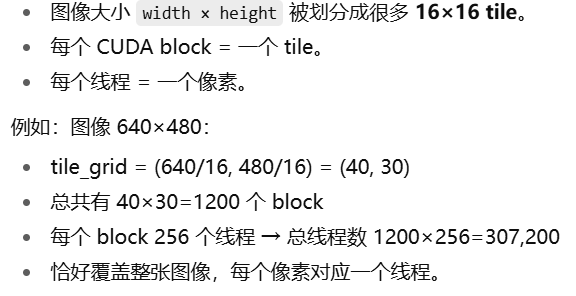
    dim3 tile_grid((width + BLOCK_X - 1) / BLOCK_X, (height + BLOCK_Y - 1) / BLOCK_Y, 1);

    dim3 block(BLOCK_X, BLOCK_Y, 1);

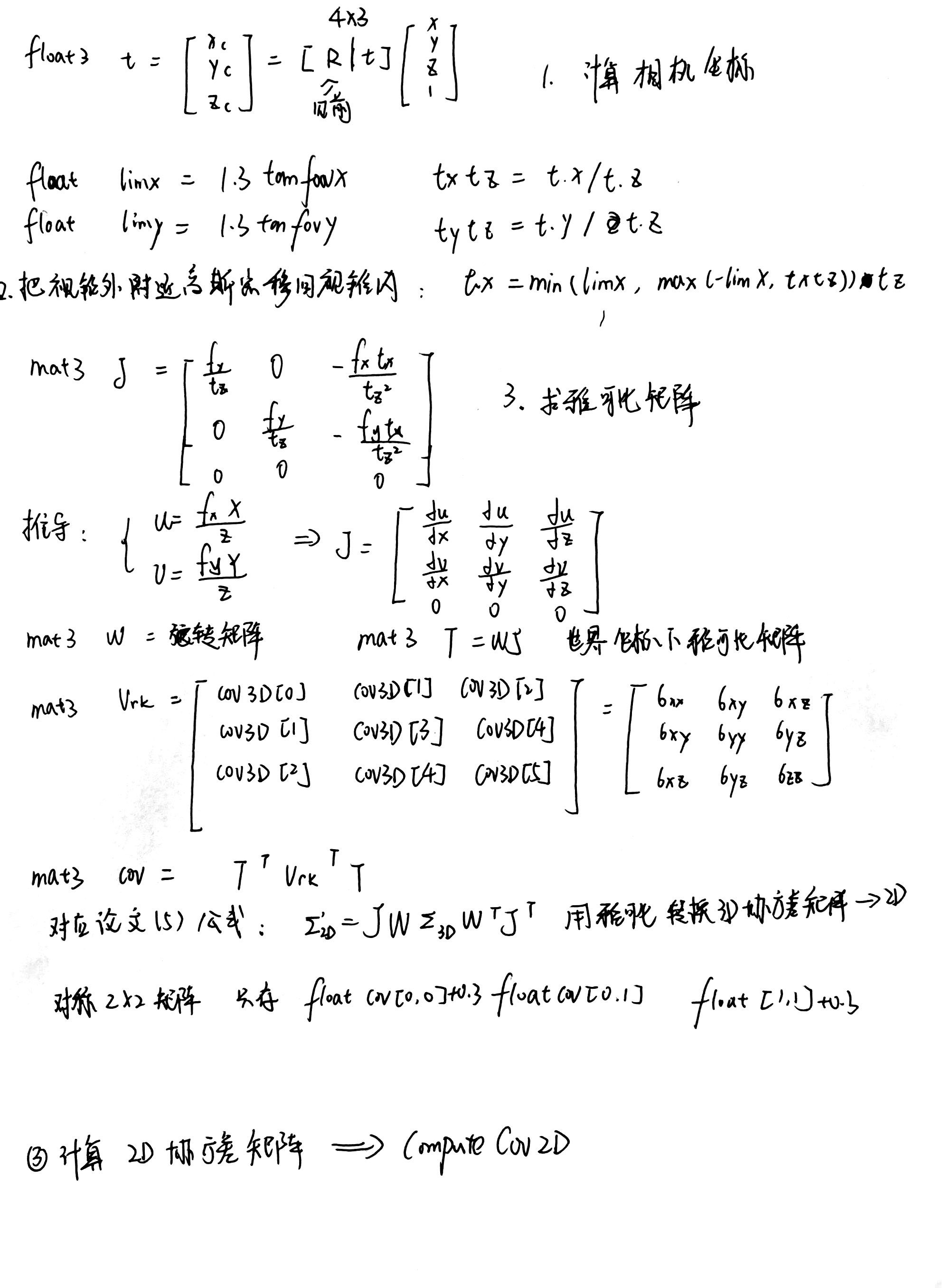
forward->preprocessCUDA

半径 边缘触碰置0
近裁剪(见裁剪空间)


排序
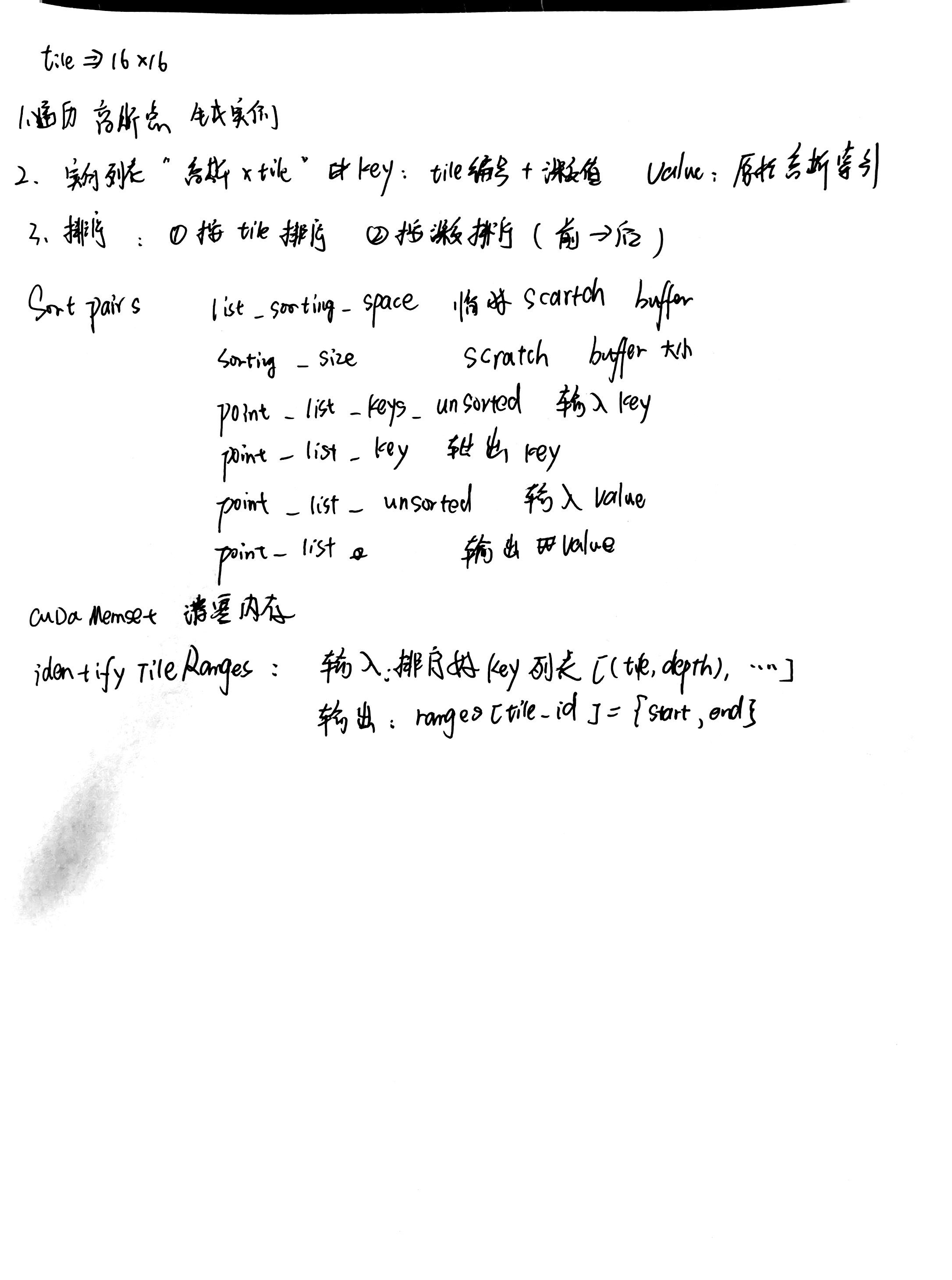
render
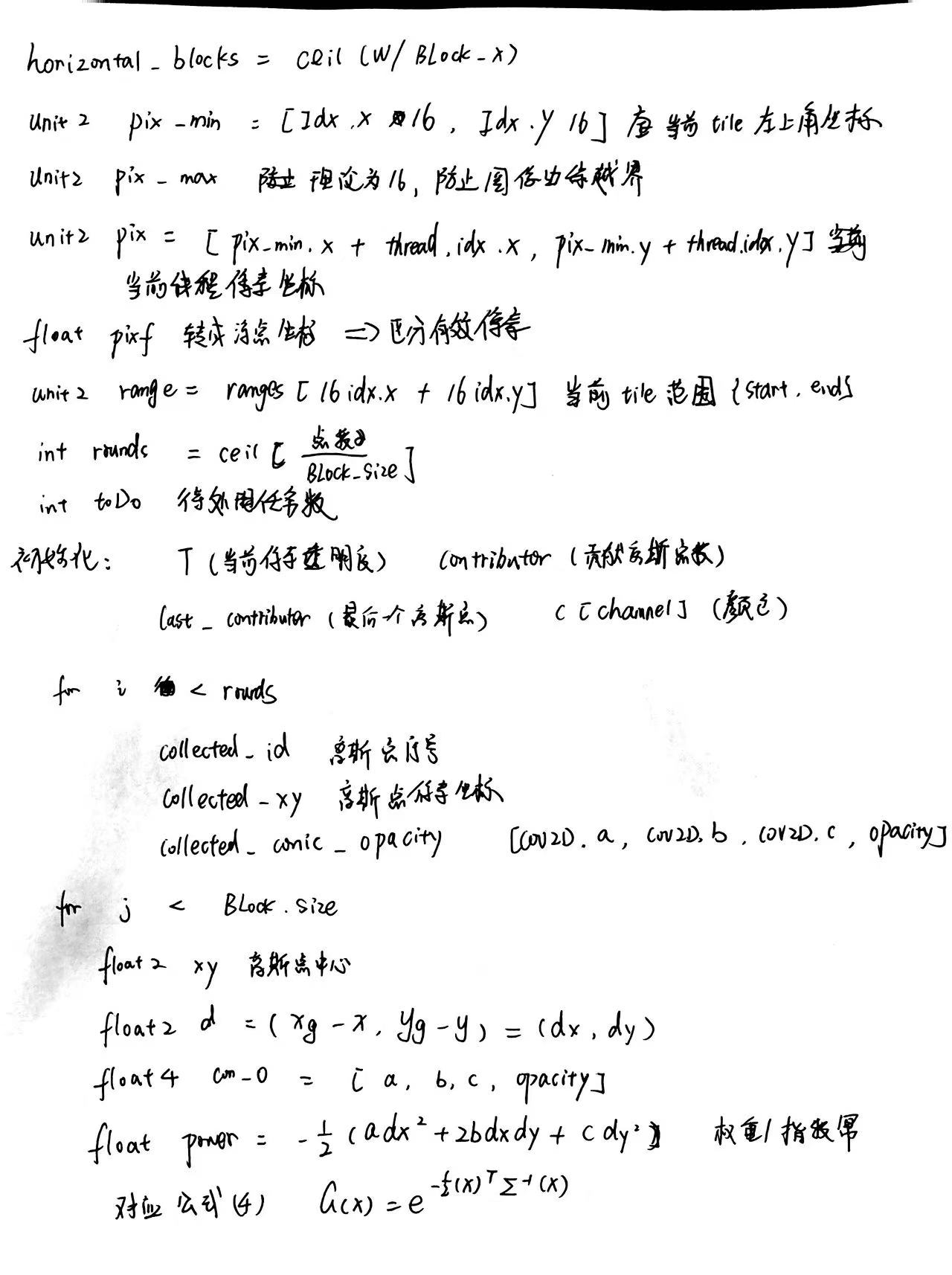
1
2
3
4
5
6
7
8
9
10
11
12
13
14
15
16
17
18
19
20
21
22
23
24
25
26
27
28
29
30
31
32
33
34
35
36
37
38
39
40
41
42
43
44
45
46
47
48
49
50
51
52
53
54
55
56
57
58
59
60
61
62
63
64
65
66
67
68
69
70
71
72
73
74
75
76
77
78
79
80
81
82
83
84
85
86
87
88
89
90
91
92
93
94
95
96
97
98
99
100
101
102
103
104
105
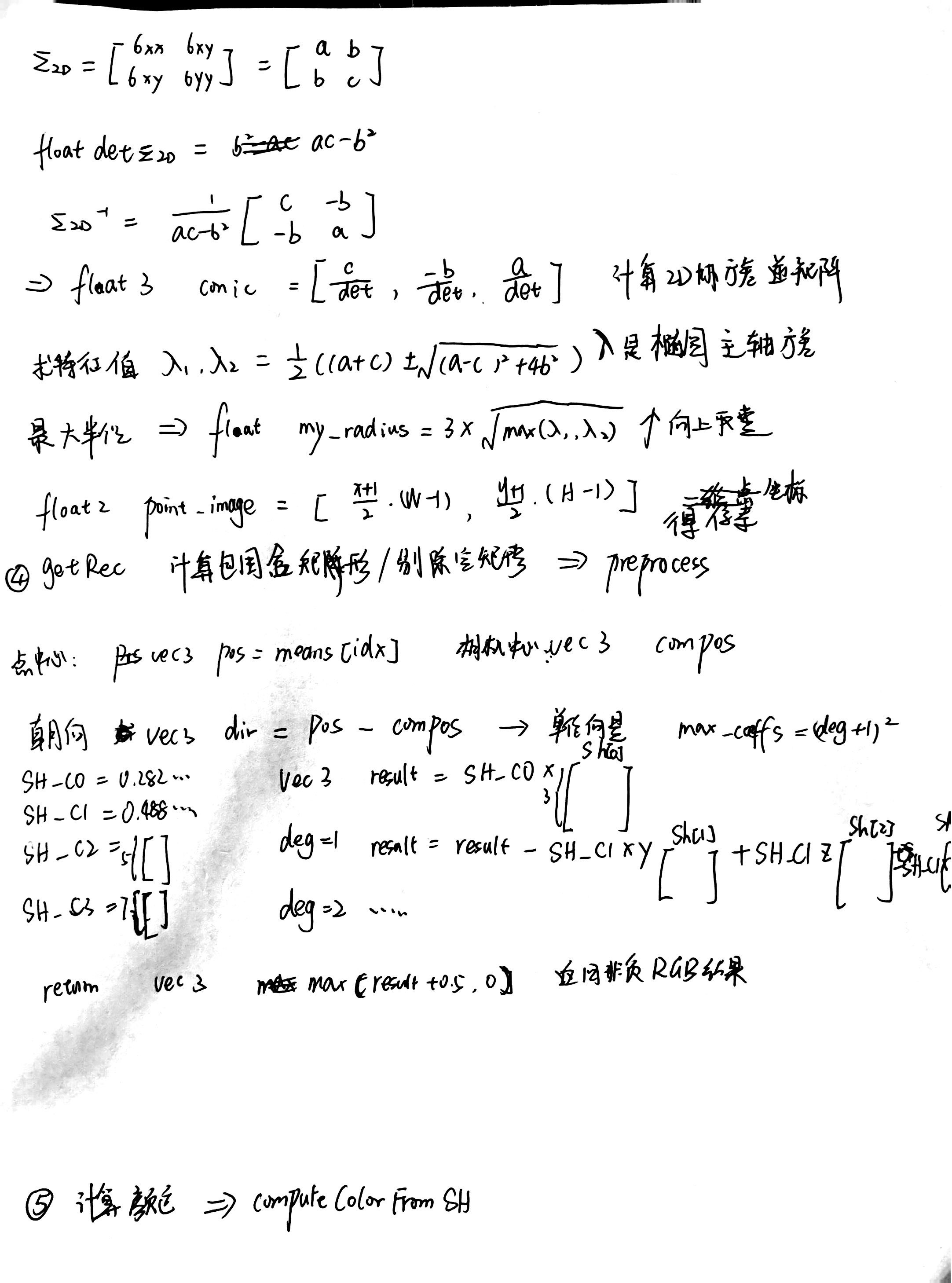
    // Resample using conic matrix (cf. "Surface Splatting" by Zwicker et al., 2001)

    float2 xy = collected_xy[j];

    float2 d = {xy.x - pixf.x, xy.y - pixf.y};

    float4 con_o = collected_conic_opacity[j];

    float power = -0.5f * (con_o.x * d.x * d.x + con_o.z * d.y * d.y) - con_o.y * d.x * d.y;

    if (power > 0.0f)

        continue;


    // 高斯强度 m:中心≈1,边缘→0

    float m = exp(power);


    // Eq. (2) from 3D Gaussian splatting paper.

    // 标准不透明度(不再做 alpha=1-alpha 的反转)

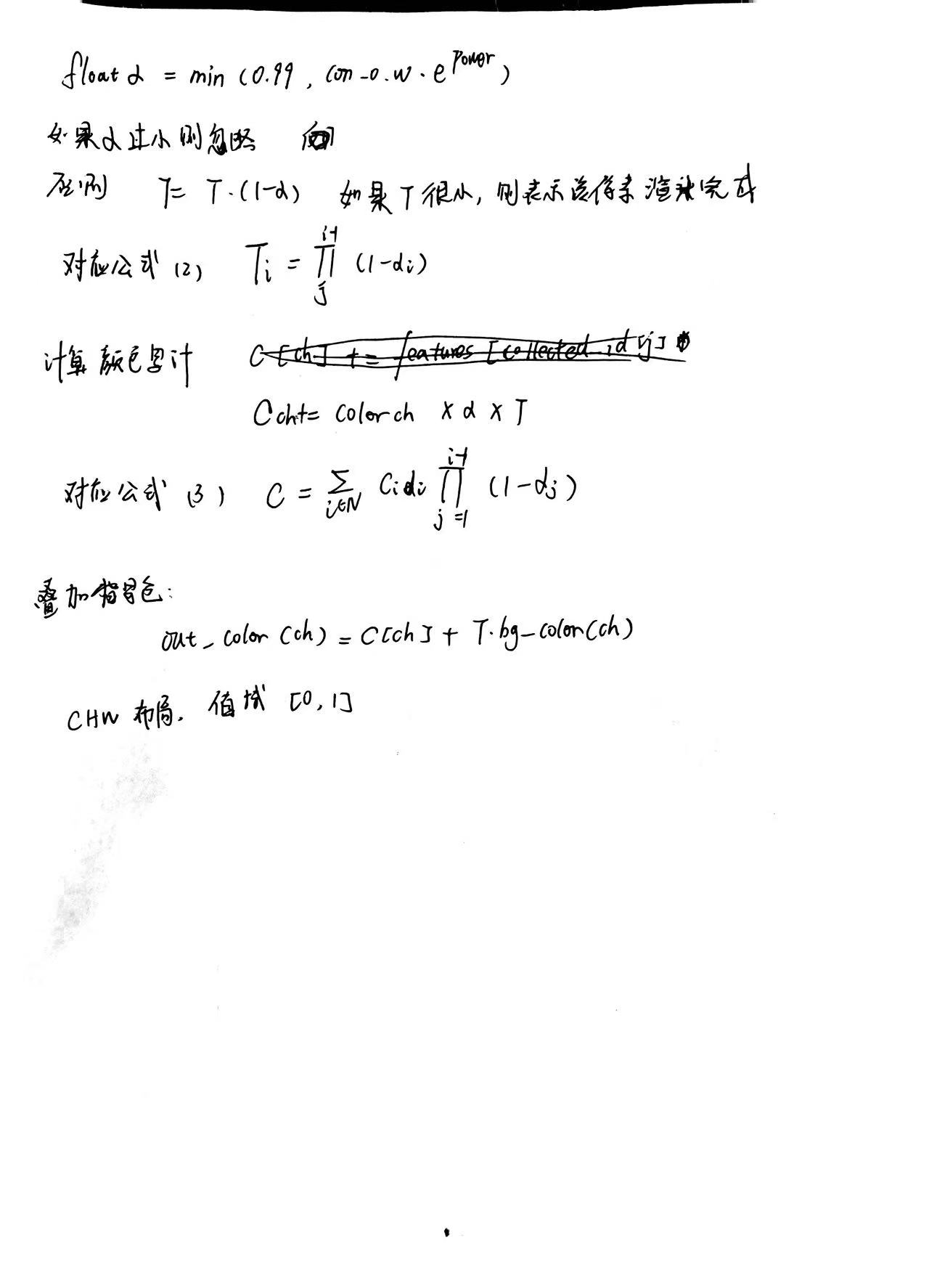
    float alpha = min(0.99f, con_o.w * m);


    // 略收紧 alpha,让边缘更快变透明(增强体积感)

    // 可按需调节 1.6f(1.3~2.2)

    alpha *= powf(m, 1.6f);

    alpha = min(alpha, 0.99f);


    // 抑制太小的贡献,避免噪声;想要更柔边缘可降到 10/255

    if (alpha < 20.0f / 255.0f)

        continue;


    alpha = 1- alpha;

    // 提升中心亮度 + 压暗边缘(只作用于颜色,不影响 alpha/T)

    // 参数可调:0.8f 越小中心越亮;2.0f 越大边缘越黑

    float center_boost = powf(m, 0.2f);

    float edge_vign    = 1.0f - powf(m, 8.0f);

    float shade        = 1.0f + 0.50f * center_boost   // 中心抬亮

                               - 0.8f * edge_vign;    // 边缘压暗

    // 防止过曝/过暗

    shade = fminf(fmaxf(shade, 0.0f), 1.5f);


    float test_T = T * (1.0f - alpha);

    if (test_T < 0.0001f)

    {

        done = true;

        continue;

    }


    // Eq. (3) from 3D Gaussian splatting paper.

    // 颜色累积:乘上 shade 增强立体感

    for (int ch = 0; ch < CHANNELS; ch++)

        C[ch] += features[collected_id[j] * CHANNELS + ch] * alpha * T * shade;


    // 深度期望值:保持与颜色同样的权重 alpha*T(不乘 shade)

    if (invdepth)

        expected_invdepth += (1.0f / depths[collected_id[j]]) * alpha * T;


    T = test_T;

    last_contributor = contributor;

    continue;

1
2
3
4
5
6
7
8
9
10
11
12
13
14
15
16
17
18
19
20
21
22
23
24
25
26
27
28
29
30
31
32
33
34
35
36
37
38
39
40
41
42
43
44
45
46
47
48
49
50
51
52
53
54
55
56
57
58
59
60
61
62
63
64
65
66
67
68
69
70
71
72
73
74
75
76
77
78
79
80
81
82
83
84
85
86
87
88
89
90
91
92
93
94
95
96
97
98
99
100
101
102
103
104
105
106
107
108
109
110
111
112
113
114
115
116
117
118
119
120
121
122
123
124
125
126
127
128
129
130
131
132
133
134
135
136
137
138
139
140
141
142
143
144
145
146
147
148
149
150
151
152
153
154
155
156
157
158
159
160
161
162
163
164
165
166
167
168
169
170
171
172
173
174
175
176
177
178
179
180
181
182
183
184
185
186
187
188
189
190
191
192
193
194
195
196
197
198
199
200
201
202
203
204
205
206
207
208
209
210
211
212
213
214
215
216
217
218
219
220
221
222
223
224
225
226
227
228
229
230
231
232
233
234
235
236
237
238
239
240
241
242
243
244
245
246
247
248
249
250
251
252
253
254
255
256
257
258
259
260
261
262
263
264
265
266
267
268
269
270
271
272
273
274
275
276
277
278
279
280
281
282
283
284
285
286
287
288
289
290
291
292
293
294
295
296
297
298
299
300
301
302
303
304
305
306
307
308
309
310
311
312
313
314
315
316
317
318
319
320
321
322
323
324
325
326
327
328
329
330
331
332
333
334
335
336
337
338
339
340
341
342
343
344
345
346
347
348
349
350
351
352
353
354
355
356
357
358
359
360
361
362
363
364
365
366
367
368
369
370
371
372
373
374
375
376
377
378
379
380
381
382
383
384
385
386
387
388
389
390
391
392
393
394
395
396
397
398
399
400
401
402
403
404
405
406
407
408
409
410
411
412
413
414
415
416
417
418
419
420
421
422
423
424
425
426
427
428
429
430
431
432
433
434
435
436
437
438
439
440
441
442
443
444
445
446
447
template <uint32_t CHANNELS>

__global__ void __launch_bounds__(BLOCK_X *BLOCK_Y)

    renderCUDA_Ellipsoid(

        // 瓦片 & 调度

        const uint2 *__restrict__ ranges,

        const uint32_t *__restrict__ point_list,

        int W, int H,


        // 输出 & 其它

        float *__restrict__ final_T,

        uint32_t *__restrict__ n_contrib,

        const float *__restrict__ bg_color,

        float *__restrict__ out_color, // CHW

        float *__restrict__ invdepth,  // 可为 nullptr

        bool ring_mode,


        // 3D 椭球 & 相机

        const float *__restrict__ means3D,       // N*3

        const glm::vec3 *__restrict__ scales,    // N

        const glm::vec4 *__restrict__ rotations, // N (qw,qx,qy,qz)

        const float *__restrict__ alphas,        // N

        const float *__restrict__ colors,        // N*CHANNELS

        const float *__restrict__ viewmatrix,    // 4x4 row-major

        const glm::vec3 *cam_pos,

        float focal_x, float focal_y,

        float cx, float cy)

{

    // --- 每线程像素定位 ---

    auto block = cg::this_thread_block();

    uint32_t horizontal_blocks = (W + BLOCK_X - 1) / BLOCK_X;


    uint2 pix_min = { block.group_index().x * BLOCK_X, block.group_index().y * BLOCK_Y };

    uint2 pix = { pix_min.x + block.thread_index().x, pix_min.y + block.thread_index().y };

    uint32_t pix_id = W * pix.y + pix.x;

    float2 pixf = { (float)pix.x, (float)pix.y };


    bool inside = pix.x < W && pix.y < H;

    bool done   = !inside;


    // --- 当前 tile 的 [start,end) ---

    uint2 range = ranges[block.group_index().y * horizontal_blocks + block.group_index().x];

    const int rounds = ((range.y - range.x + BLOCK_SIZE - 1) / BLOCK_SIZE);

    int toDo = range.y - range.x;


    __shared__ int collected_id[BLOCK_SIZE];


    // --- 累计量 ---

    float T = 1.f;

    uint32_t contributor = 0;

    uint32_t last_contributor = 0;

    float C[CHANNELS]; for (int ch = 0; ch < CHANNELS; ++ch) C[ch] = 0.f;

    float expected_invdepth = 0.f;


    // --- 相机/旋转准备 ---

    glm::vec3 Cw = *cam_pos;  // device deref

    // Rcw = (world->camera)^T

    float Rcw[9] = {

        viewmatrix[0], viewmatrix[4], viewmatrix[8],

        viewmatrix[1], viewmatrix[5], viewmatrix[9],

        viewmatrix[2], viewmatrix[6], viewmatrix[10]

    };


    for (int i = 0; i < rounds; ++i, toDo -= BLOCK_SIZE)

    {

        int num_done = __syncthreads_count(done);

        if (num_done == BLOCK_SIZE) break;


        int progress = i * BLOCK_SIZE + block.thread_rank();

        if (range.x + progress < range.y)

        {

            collected_id[block.thread_rank()] = point_list[range.x + progress];

        }

        block.sync();


        int limit = min(BLOCK_SIZE, toDo);

        for (int j = 0; !done && j < limit; ++j)

        {

            contributor++;


            int gid = collected_id[j];


            // --- 像素 -> 相机射线(注意 y 取负)---

            float3 d_cam = make_float3(

                (pixf.x - cx) / fmaxf(1e-8f, focal_x),

                -(pixf.y - cy) / fmaxf(1e-8f, focal_y),

                1.f

            );

            float invlen = rsqrtf(d_cam.x*d_cam.x + d_cam.y*d_cam.y + d_cam.z*d_cam.z);

            d_cam.x *= invlen; d_cam.y *= invlen; d_cam.z *= invlen;


            // 相机 -> 世界

            float3 d_world = mul3_Rv(Rcw, d_cam);

            float invlenw = rsqrtf(d_world.x*d_world.x + d_world.y*d_world.y + d_world.z*d_world.z);

            d_world.x *= invlenw; d_world.y *= invlenw; d_world.z *= invlenw;

            float3 o_world = make_float3(Cw.x, Cw.y, Cw.z);


            // --- 椭球局部(单位球)变换 ---

            glm::vec3 s = scales[gid];                  // TODO: 若需要,全局乘 scale_modifier

            float invSx = 1.f / fmaxf(1e-8f, s.x);

            float invSy = 1.f / fmaxf(1e-8f, s.y);

            float invSz = 1.f / fmaxf(1e-8f, s.z);

            float SInv[9] = { invSx,0,0,  0,invSy,0,  0,0,invSz };


            float Re[9]; quatToMat3_ellip(rotations[gid], Re);


            float3 mu = make_float3(

                means3D[3*gid+0], means3D[3*gid+1], means3D[3*gid+2]

            );


            // o = S^{-1} R^T (o_world - mu)

            float3 o_rel = make_float3(o_world.x - mu.x, o_world.y - mu.y, o_world.z - mu.z);

            float3 tmp1 = mul3_RT_v(Re, o_rel);

            float3 o    = mul3_Rv(SInv, tmp1);

            // d = S^{-1} R^T d_world

            float3 tmp2 = mul3_RT_v(Re, d_world);

            float3 d    = mul3_Rv(SInv, tmp2);


            // --- 与单位球相交:A t^2 + B t + C = 0 ---

            float A = d.x*d.x + d.y*d.y + d.z*d.z;

            float B = 2.f * (o.x*d.x + o.y*d.y + o.z*d.z);

            float Cq = (o.x*o.x + o.y*o.y + o.z*o.z) - 1.f;


            float alpha = 0.f;

            float t_hit = 0.f;

            const float alpha_base = alphas[gid];


            float disc = B*B - 4.f*A*Cq;

            if (disc >= 0.f && A > 0.f)

            {

                float sdisc = sqrtf(disc);

                float t1 = (-B - sdisc) / (2.f*A);

                float t2 = (-B + sdisc) / (2.f*A);

                float t  = t1 > 0.f ? t1 : (t2 > 0.f ? t2 : -1.f);


                if (t > 0.f)

                {

                    t_hit = t;

                    if (!ring_mode)

                    {

                        alpha = fminf(0.99f, alpha_base);

                    }

                    else

                    {

                        // 仅在边界附近给贡献

                        float3 phit = make_float3(o.x + t*d.x, o.y + t*d.y, o.z + t*d.z);

                        float r2 = phit.x*phit.x + phit.y*phit.y + phit.z*phit.z;

                        const float band = 0.08f;

                        float fall = expf(-50.f * fabsf(r2 - 1.f));

                        alpha = fminf(0.99f, alpha_base * fall * (fabsf(r2 - 1.f) < band));

                    }

                }

            }


            // // miss:用软壳近似(到单位球的最近距离)

            // if (alpha == 0.f)

            // {

            //     float dd = A; // d·d

            //     if (dd > 0.f)

            //     {

            //         float t_star = -(o.x*d.x + o.y*d.y + o.z*d.z) / dd;

            //         if (t_star > 0.f)

            //         {

            //             float3 pstar = make_float3(o.x + t_star*d.x, o.y + t_star*d.y, o.z + t_star*d.z);

            //             float r2min = pstar.x*pstar.x + pstar.y*pstar.y + pstar.z*pstar.z;

            //             float eps = fmaxf(0.f, r2min - 1.f);


            //             const float k = 15.f;

            //             const float band = 0.08f;

            //             float fall = expf(-k * eps);

            //             if (eps <= band)

            //             {

            //                 alpha = fminf(0.99f, alpha_base * fall);

            //                 t_hit = t_star; // 近似用于深度

            //             }

            //         }

            //     }

            // }


            if (alpha <= 0.f) continue;


            float test_T = T * (1.f - alpha);

            // 先加色,再更新 T(与 3DGS 一致)

            for (int ch = 0; ch < CHANNELS; ++ch)

                C[ch] += colors[gid*CHANNELS + ch] * alpha * T;


            // invdepth:用相机系 z(更稳)

            if (invdepth && t_hit > 0.f)

            {

                float3 Xw = make_float3(

                    o_world.x + t_hit * d_world.x,

                    o_world.y + t_hit * d_world.y,

                    o_world.z + t_hit * d_world.z

                );

                // world->camera 旋转

                float Rwc[9] = {

                    viewmatrix[0], viewmatrix[1], viewmatrix[2],

                    viewmatrix[4], viewmatrix[5], viewmatrix[6],

                    viewmatrix[8], viewmatrix[9], viewmatrix[10]

                };

                float3 Xrel = make_float3(Xw.x - Cw.x, Xw.y - Cw.y, Xw.z - Cw.z);

                float3 Xc = mul3_Rv(Rwc, Xrel);

                float zc = fmaxf(1e-6f, Xc.z);

                expected_invdepth += (1.f / zc) * alpha * T;

            }


            T = test_T;

            last_contributor = contributor;


            if (T < 1e-4f) { done = true; }

        }

    }


    if (inside)

    {

        final_T[pix_id] = T;

        n_contrib[pix_id] = last_contributor;

        for (int ch = 0; ch < CHANNELS; ++ch)

            out_color[ch * H * W + pix_id] = C[ch] + T * bg_color[ch];


        if (invdepth)

            invdepth[pix_id] = expected_invdepth;

    }


}

1
2
float val = exp(power);
C[ch] += features[collected_id[j] * CHANNELS + ch]*  log(1.0f + val);

1
2
float val = exp(power);
C[ch] += features[collected_id[j] * CHANNELS + ch]*  (val / (1.0f + val));

1
C[ch] += features[collected_id[j] * CHANNELS + ch] * exp(power) * 0.03f;

![][https://picgo.kfzzzzzz.cn/20250909111643.png]

1
2
3
4
float val = exp(power);
float gamma = 1.2f;
val = pow(val, gamma);
C[ch] += features[collected_id[j] * CHANNELS + ch]*  val;

1
C[ch] += features[collected_id[j] * CHANNELS + ch] * val * 0.05f;

论文阅读

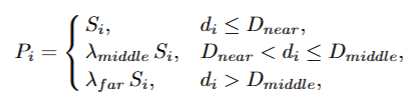
DroneSplat: 3D Gaussian Splatting for Robust 3D Reconstruction from In‑the‑Wild Drone Imagery

会议:(CVPR) 2025
作者:Jiadong Tang, Yu Gao, Dianyi Yang, Liqi Yan, Yufeng Yue, Yi Yang 北理/杭电

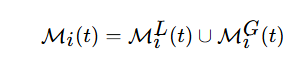
1.自适应局部-全局掩码

思路:

增加mask消除 移动部件对loss影响
![][https://picgo.kfzzzzzz.cn/lunwengongshi1.png]]

1.残差计算(原始loss公式)

![][https://picgo.kfzzzzzz.cn/20251020220809.png]]

2.计算第t次迭代第i个视角第j个对象的残差(每个分割物体的残差)
![][https://picgo.kfzzzzzz.cn/20251020222716.png]
m 由segment anything 分割得到的各个区域

计算局部掩码

3.计算判断移动物体的自适应阈值
计算第t次迭代的残差期望与方差

判断所有的移动物体的残差都在残差期望±1个标准差 异常检测阈值:期望+方差
并增加随迭代递减的方差权重项

4.计算mask 部件平均残差超过阈值

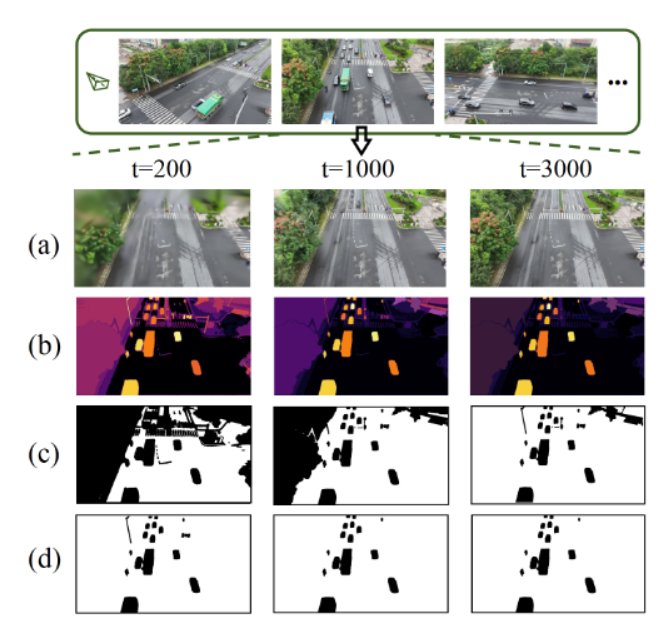
计算全局掩码
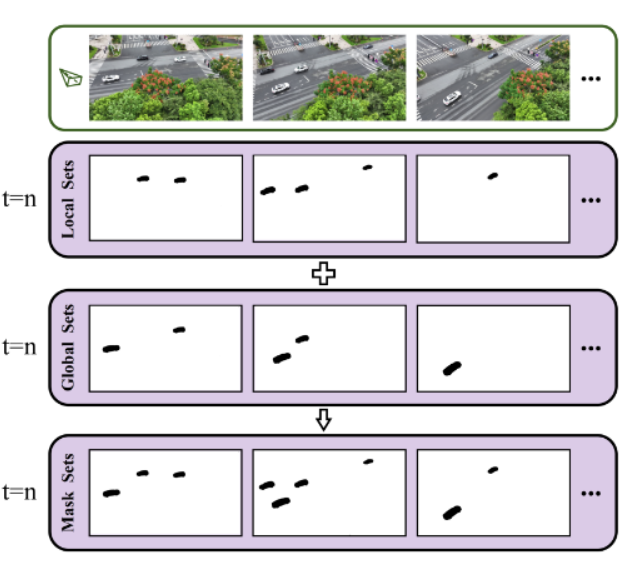

5.阈值

6.某一帧超过阈值的object 提取 中心点和四个边缘点输入 SA 移动mask
7.定义一个全局掩码合集每一次迭代都更新
2.Voxel-guided Optimization

1.增加DUSt3R输出稠密点作为几何先验以解决视角稀疏问题

2.筛选点 计算SPFH 并乘上每个点的置信度得到 每个点的score 并选择得分高的点


3.划分体素网格,在优化过程中约束高斯点

D2GS: Depth-and-Density Guided Gaussian Splatting for Stable and Accurate Sparse-View Reconstruction

会议:预印本
作者:Meixi Song/Xin Lin/Dizhe Zhang/Haodong Li/Xiangtai Li/Bo Du/Lu Qi Insta360 Research
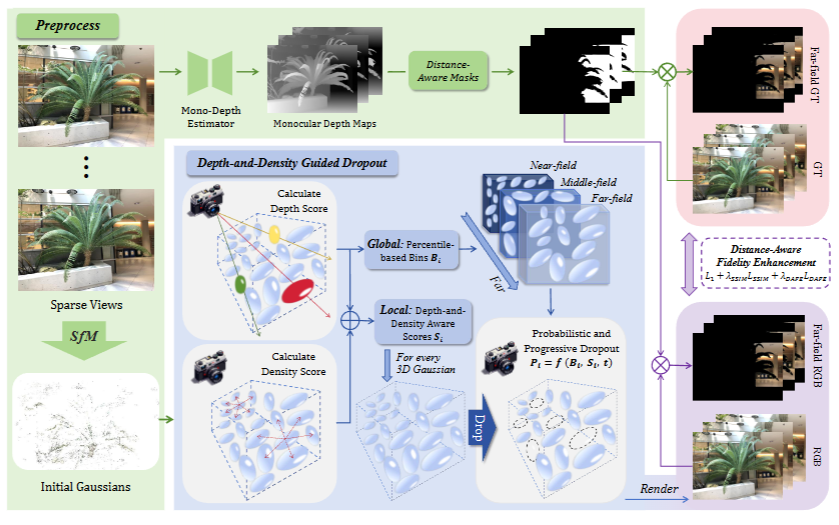

问题:近场过拟合/远场欠拟合

DEPTH-AND-DENSITY GUIDED DROPOUT

1.计算每个高斯的dropout score

1
2
3
4
5
6
7
8
9
10
11
12
depth_score = (1.0 - (camera_depths - depth_min) / (depth_max - depth_min + 1e-6)).float() 


density_norm = torch.ones_like(depth_score) * 0.5  

        if pc.density_score.numel() >= opacity.shape[0]:

            density_score = (pc.density_score[:opacity.shape[0]] + 1e-6).float()

            density_norm = ((density_score - density_score.min()) / (density_score.max() - density_score.min() + 1e-6)).float()
           
combined_score = (depth_weight * depth_score + density_weight * density_norm).float()

2.划分近中远三区域,每个区域设置不同的dropout率

1
2
3
4
5
        near_field = camera_depths <= depth_percentile_33

        mid_field = (camera_depths > depth_percentile_33) & (camera_depths <= depth_percentile_67)

        far_field = camera_depths > depth_percentile_67

3.增加基于迭代的系数

1
2
3
progress = min(1.0, iteration / 10000.0)

        drop_rate = float(drop_min + (drop_max - drop_min) * progress)

4.最终mask计算

1
2
3
4
5
        drop_prob = (near_field.float() * combined_score * drop_rate +

                    mid_field.float() * combined_score * drop_rate * 0.7 +

                    far_field.float() * combined_score * drop_rate * 0.3)

5.实现dropout

1
opacity = opacity * mask[:, None]

DISTANCE-AWARE FIDELITY ENHANCEMENT

1.通过单目深度估计模型预测深度图预处理远处1近处0的二值mask(源码中无指出模型,直接是加载preprocess_mask)

1
far_mask = mask_cache[viewpoint_cam.image_name]

2.计算distance-enhanced loss

1
2
3
4
5
6
7
            gt_far = apply_mask_to_image(gt_image, far_mask)

            render_far = apply_mask_to_image(image, far_mask)

            far_loss = l1_loss(render_far, gt_far)

            loss = loss + opt.lambda_far * far_loss

3.加入损失函数
![][https://picgo.kfzzzzzz.cn/20251021010042.png]

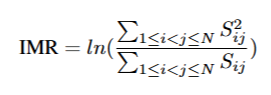
INTER-MODEL ROBUSTNESS ASSESSMENT

两个高斯点之间的差异:the Wasserstein distance admits a closed-form via
the Bures metric


![][https://picgo.kfzzzzzz.cn/20251021013227.png]

计算两个3DGS模型的差异:OT problem over the Gaussian components

Sinkhorn algorithm

LP‑3DGS: Learning to Prune 3D Gaussian Splatting

会议:NeurIPS 2024
作者:Zhaoliang ZhangTianchen SongYongjae LeeLi YangCheng PengRama ChellappaDeliang Fan
单位:Johns Hopkins University
内容:

每一次都把这个mask加到opacity上,在训练结束后进行硬剪枝

pixelSplat: 3D Gaussian Splats from Image Pairs for Scalable Generalizable 3D Reconstruction

会议:CVPR 2024
作者:David Charatan, Sizhe Li, Andrea Tagliasacchi, Vincent Sitzmann
单位:MIT/google research
内容:一个前馈模型 “pixelSplat”,从输入一对图像 + 相机参数出发,预测场景的3D 高斯基元表示。网络框架:Two-view Image Encoder+Pixel-aligned Gaussian Prediction

SuGaR: Surface-aligned Gaussian Splatting for Efficient 3D Mesh Reconstruction and High-quality Mesh Rendering

会议 :CVPR 2024
作者: Antoine Guédon、Vincent Lepetit
单位:法国
内容:提出 Surface-aligned regularization 使高斯分布与表面对齐,并通过 Poisson 重建提取三角网格;在此基础上可联合优化高斯与网格,实现可编辑的混合表示,渲染质量高、几何一致性好。

2D Gaussian Splatting for Geometrically Accurate Radiance Fields

会议:SIGGRAPH 2024
作者:Binbin HuangZehao YuAnpei ChenAndreas GeigerShenghua Gao
单位:上海科技大学
内容:用 2D 定向高斯盘来替代传统的 3D 高斯体元把场景体积“折叠”为一系列贴表面的 2D 高斯元,高斯参数保留切向向量和scale,易于计算法线

3DGS-Enhancer: Enhancing Unbounded 3D Gaussian Splatting with View-consistent 2D Diffusion Priors

会议:NeurIPS 2024
作者:Xi LiuChaoyi ZhouSiyu Huang
单位:Clemson University
内容:利用 Stable Video Diffusion 模型生成视图一致的图像先验,将 2D 扩散结果蒸馏回 3DGS,显著改善无界场景一致性与视觉质量。

Gaussian Splatting with Discretized SDF for Relightable Assets

会议:ICCV 2025
作者:Zuo-Liang Zhu、Jian Yang、Beibei Wang
单位:南开大学/南京大学
内容:用2DGS得到法线,将Discretized SDF引入到 3DGS表示中

Mip‑Splatting: Alias‑free 3D Gaussian Splatting

会议:CVPR 2024
作者:Zehao YuAnpei ChenBinbin HuangTorsten SattlerAndreas Geiger
内容:在 拍摄距离/焦距变化(采样率变化)下产生锯齿/混叠 (aliasing) 的问题:提出一个 3D 平滑滤波器 + 2D Mip 滤波器

EDGS: Eliminating Densification for Efficient Convergence of 3DGS

会议:
作者:Dmytro Kotovenko,Olga Grebenkova,Björn Ommer
单位: Ludwig-Maximilians-Universität München (LMU Munich)
内容:根据roma在train之前计算稠密点,通过获得的置信度图片和点对,修改三角化过程,在训练过程中跳过致密化环节

截屏2025-10-23 10.52.39.png

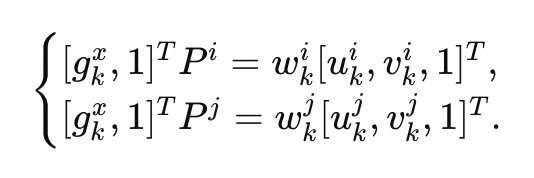
使用RoMa 网络 输入两幅图像,输出像素对应图 以及置信度图片


gkx 三维空间中某个点 经过 相机投影矩阵P(3*4)投射到对应像素位置 (u,v) w归一化

3行除以1行
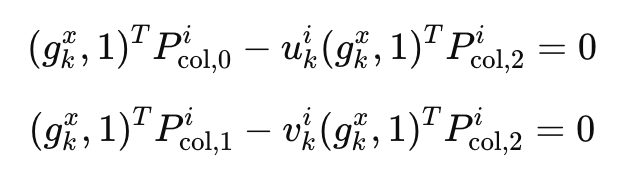
四条公式的约束:
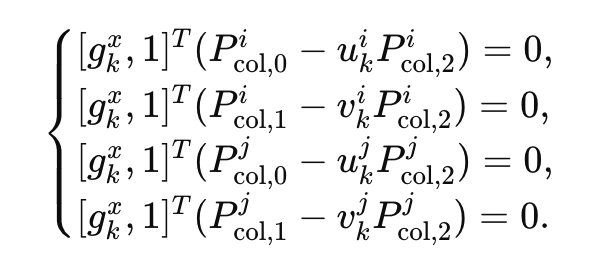
类似 opencv triangulatePoints()过程

4D Gaussian Splatting: Modeling Dynamic Scenes with Native 4D Representation

作者:
会议:ICLR2024
单位:复旦大学

动态场景的4D高斯模型

引入每个时间 高斯对像素影像的概率p(u,v|t)

  • pi(t)p_i(t)pi​(t):第 iii 个高斯在时间 t 存在或起作用的总体概率(比如这个高斯在 t 时刻是否还“存在”);

  • pi(u,v∣t)p_i(u,v|t)pi​(u,v∣t):在时间 t 时,它在屏幕坐标 (u,v) 上的条件投影概率(它在屏幕上投到哪儿)。
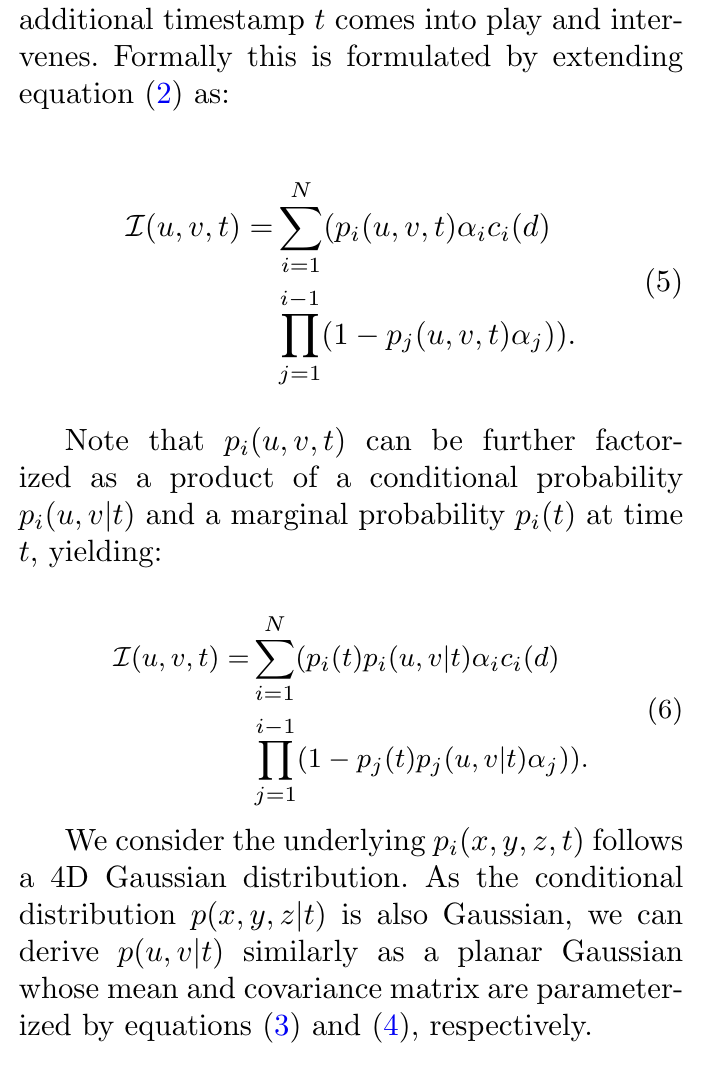

把时间t融入到高斯球属性,均值属性,求解协方差矩阵时也求解4x4的矩阵

SDD-4DGS: Static-Dynamic Aware Decoupling in Gaussian Splatting for 4D Scene Reconstruction

4D Gaussian Videos with Motion Layering
存储初始高斯以及每帧位移 不存储高斯颜色旋转尺度等变化

Sc-gs: Sparsecontrolled gaussian splatting for editable dynamic scene
用控制点 + LBS

4D3R:motion-aware neural reconstruction and rendering of dynamic scences from monocular videos
在sc-gs基础上 去除了colmap

项目总结

1.收获:思路方面更加严谨,发现问题解决问题的思路,比如输出深度图,用可视化方式去看每一次迭代的图像变化等等。虽然麻烦但是能发现问题所在
2.在论文撰写方面,熟悉投稿流程和overleaf等等,在形式上发一篇论文没问题
3.对3DGS源码的了解,

思考
1.项目管理问题,版本非常多,现在用V1-V22版本,每个版本上又有不同的变种和参数,调试起来困难难对齐
2.一直在尝试不同trick并没能确定一个最终版本去调试参数,最终很多调试其实并没有用上,比如正则化能提高PSNR但是增加了时间,剪枝在train场景效果很好但在其他场景一般而且稀释了active set的效果
3.我在测试之后没有出具好读的文档,都是通过问的方式确定参数,有些参数就很难对齐

尝试了在长轴生成点/用taming的fps做剪枝视角选择/每次训练都记录所有高斯点的vi/

项目数据

各步骤时间 无加速 k=30 k=50
backward_time 71.37 46.26 \
densification 0.3764 \ \
forward_time 75.4 58.25 \
step 93.51 55.15 \
active_update 0 49.7 80.34
total_time 250.4 219.5 254.1
PSNR 22.28 21.40 21.46

无排序无截断:231.39229482913035 前15000次
有排序有截断:289.9748523981556 前15000次

active_update各步骤时间(单视角单迭代)

step time(ms)
render 3.459 7.277 2.773
loss computation 0.805 0.772 0.577
backward 5.652 5.312 4.332
add_gradient_stats 1.209 1.710 1.055
optimizer.zero_grad 0.237 0.405 0.218
total 11.362 15.475 8.955
opacity PSNR
0.0005 21.435432936015882
0.005 base
0.05 21.438090826335706
0.5 21.491223259976035
vi_lr PSNR
0.0005 21.220848961880332
0.005 base
0.05 21.346949602428236
点数
第15100次
total_number = 796604
Inactive points - New: 784918 ratio: 0.9853

第15200次
total_number = 796604
Inactive points - New: 697601 ratio: 0.8757
Inactive points - Added: 911 and ratio: 0.0013
Inactive points - Removed: 88228 and ratio: 0.1265

第15300次
total_number = 796604
Inactive points - New: 697064 ratio: 0.8750
Inactive points - Added: 10581 and ratio: 0.0152
Inactive points - Removed: 11118 and ratio: 0.0159

第15400次
total_number = 796604
Inactive points - New: 696749 ratio: 0.8746
Inactive points - Added: 8286 and ratio: 0.0119
Inactive points - Removed: 8601 and ratio: 0.0123

最后稳定在add和remove 4000左右

xyz_grad_threshold = 1e-3
scaling_grad_threshold = 1e-6
rotation_grad_threshold = 1e-5
opacity_grad_threshold = 1e-6
weight_v_grad_threshold = 1e-5
feature_grad_threshold = 5e-6

19.74828004837036

22.37305570903577

step1 3.771
step2 4.075
step3 13.81
step4 3.245
step5 41.05
step6 3.421
gradient k PSNR time
1 50 22.147510277597526

RP

三维资产重建

三维场表示方式 3DGS

FlipNeRF [55] and MixNeRF [ 56 ]. FlipNeRF signifi-
cantly reduces floating artifacts by introducing flipped reflective rays to filter out invalid
light rays and accurately reconstruct surface normals.

SuGaR utilizes surface-aligned
Gaussian distributions to accurately extract meshes and quickly and scalably generate
meshes using a Poisson reconstruction algorithm. Additionally, SuGaR introduces an op-
tional refinement strategy, enhancing mesh quality and rendering effects through Gaussian
binding and joint optimization. This method not only improves reconstruction accuracy but
also facilitates subsequent applications such as editing, sculpting, animation, and relighting.

PixelSplat
In addition, in terms of 3D editing, the introduction of PixelSplat [ 88] technology
provides users with a more flexible and efficient 3D creation tool. This technology leverages
a feedforward model to reconstruct a 3D radiance field parameterized by 3D Gaussian
primitives from input image pairs, achieving scalable training and fast 3D reconstruction.
At the same time, the generated 3D radiation field is interpretable and editable, providing
users with rich creative materials and convenient means of creation in multiple fields such
as VR/AR, game development, and architectural design. The emergence of PixelSplat
technology has further promoted the development of 3D editing technology, bringing users
a richer creative experience and a broader creative space.

Our method
consists of a two-view image encoder and a pixel-aligned
Gaussian prediction module

通过明暗场学习高斯法线参数
3DGS可编辑 可以调材质/纹理/光照

目前可能可以获取的先验信息,扫一次物体得到的图像uncertianly热力图,然后能够进行NBV,重新获取该视角下的物体图片。

作者

kfzzzzzz

发布于

2025-12-01

更新于

2026-01-11

许可协议

评论